


TL;DR:
- Fast website load times increase customer retention and boost search engine rankings. Improving Core Web Vitals and reducing TTFB are essential for better traffic, conversions, and AI search visibility. Speed should be a business priority, not just a technical issue, for ongoing growth.
Site speed is the measurement of how quickly a website loads and responds to user requests, and it directly controls whether customers stay, buy, or leave. A 1-second delay in load time cuts conversion rates by up to 7%. That single number explains why site speed matters more than most small business owners realize. Google’s Core Web Vitals, including Largest Contentful Paint (LCP), Interaction to Next Paint (INP), and Cumulative Layout Shift (CLS), are the industry standard benchmarks that search engines and users both judge your site by. Get these right, and you gain more traffic, more trust, and more revenue.
How does site speed affect customer experience?
Your website’s speed shapes how customers feel about your business before they read a single word. Users form brand credibility impressions in under 0.05 seconds, and load speed drives that perception more than design or color choices. A slow site signals incompetence, even if your services are excellent.
The behavior patterns are clear and consistent:
- Bounce rate spikes when pages take more than 3 seconds to load. Visitors leave before seeing your offer.
- Mobile users suffer most. Customers on slower cellular connections experience delays that desktop users never encounter.
- Frustration compounds. A visitor who waits once is unlikely to return, even after you fix the problem.
- Trust erodes silently. Slow load times create doubt about your business’s reliability before any transaction occurs.
- Engagement drops. Slow pages produce lower dwell time, fewer page views per session, and weaker conversion signals.
Observing full user experience distributions reveals the real damage. Even if 75% of your visitors experience fast load times, the remaining 25% on slower networks face broken experiences that cost you revenue. Median scores hide this problem entirely.
Pro Tip: Use Google’s Chrome User Experience Report (CrUX) to see real-user field data for your site, not just lab results. It shows how your slowest visitors actually experience your pages, which is where most revenue loss hides.

Why does site speed matter for SEO and search rankings?
Site speed is not one SEO factor among many. Speed is the foundational baseline without which every other SEO effort underperforms. Content, backlinks, and keyword targeting all depend on search engines being able to crawl and index your pages efficiently.
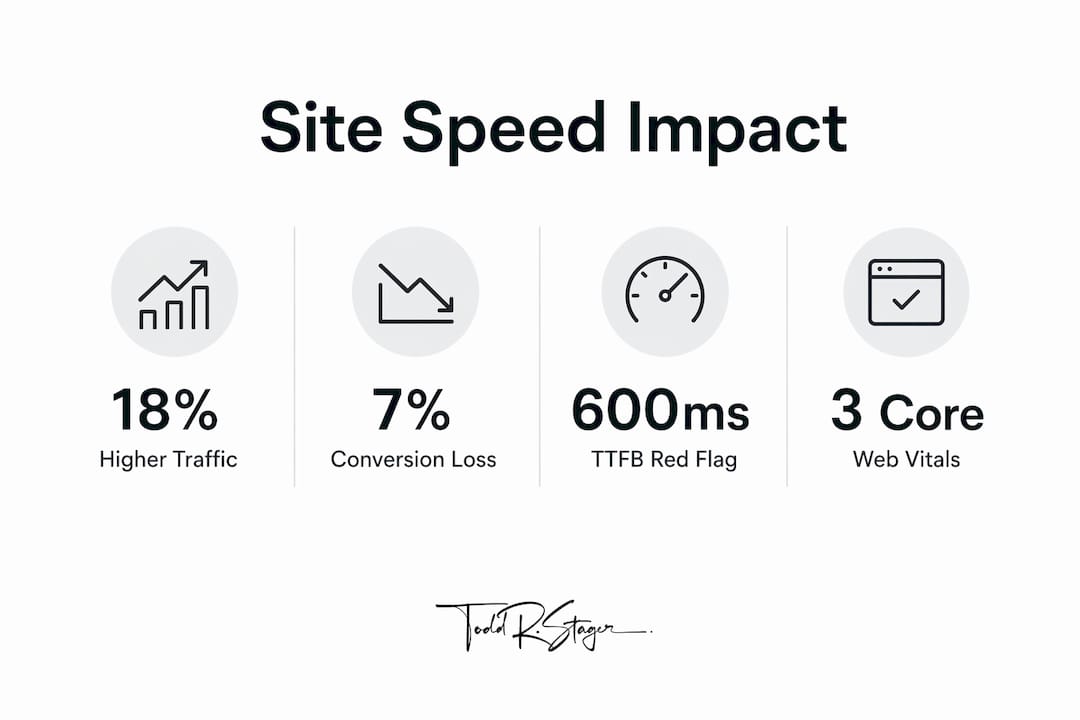
Google’s 2026 core update made this concrete. Sites meeting Core Web Vitals thresholds earn 18% higher organic traffic than sites that fail them. The average load time for pages ranking in Google’s top 10 results is 1.65 seconds. That is the competitive standard your site is measured against.
| SEO factor | Slow site impact | Fast site advantage |
|---|---|---|
| Crawl efficiency | Crawlers index fewer pages per session | More content discovered and ranked faster |
| Core Web Vitals score | Fails LCP, INP, or CLS thresholds | Passes all three, earns ranking boost |
| Organic traffic | Lower visibility in search results | Up to 18% higher organic traffic |
| AI search citations | Risk of exclusion from AI summaries | Eligible for ChatGPT and Perplexity citations |
| Dwell time signal | Users leave fast, weakening engagement signals | Longer sessions reinforce content relevance |
The AI search dimension is new and growing. AI crawlers apply strict timeouts, and a high Time to First Byte (TTFB) causes your site to be excluded from AI-generated answers on platforms like ChatGPT and Perplexity. This is Generative Engine Optimization (GEO), the emerging practice of making content eligible for AI citation. Speed is the entry requirement. A faster page also saves crawl budget, allowing search engines to index more of your content in each crawl cycle.
Pro Tip: Check your TTFB using Google PageSpeed Insights or WebPageTest. A TTFB above 600ms is a red flag for both traditional SEO and AI search visibility. Target under 200ms for the best results.
What is the ideal site speed goal for small business websites?
Google’s Core Web Vitals define the performance targets every small business website should meet. These are not aspirational numbers. They are the thresholds that determine whether your site passes or fails Google’s ranking assessment.
Core Web Vitals benchmarks
LCP (Largest Contentful Paint) measures how long it takes for the main content of a page to appear. The target is under 2.5 seconds. Pages hitting this mark load the hero image or headline text fast enough that users feel immediate progress.
INP (Interaction to Next Paint) replaced First Input Delay in 2024 and measures how quickly your page responds to clicks, taps, and keyboard input. The target is under 200 milliseconds. A sluggish INP makes your site feel broken even when it loads fast.
CLS (Cumulative Layout Shift) measures visual stability. A score under 0.1 means your page elements do not jump around as the page loads. Layout shifts frustrate users and cause accidental clicks, which drives people away.
TTFB (Time to First Byte) is the time from a user’s request to the first byte of data arriving from your server. Under 200ms is the standard for strong performance. High TTFB is often a hosting problem, not a code problem.
The conversion data reinforces these targets. Sites loading under 2 seconds show 2.4 times higher conversion rates compared to sites taking more than 5 seconds. Every 100 milliseconds of improvement produces roughly a 1% lift in conversions. For a small business generating $20,000 per month online, that math adds up quickly.
Continuous real-user monitoring catches performance regressions before they damage rankings or revenue. A plugin update, a new image, or a third-party script can quietly push your LCP past the 2.5-second threshold overnight.
Practical steps to improve your site’s loading speed
Improving site speed does not require a developer on staff. Most gains come from a short list of high-impact changes that any small business owner can prioritize.
Compress and resize images. Oversized images are the single most common cause of slow LCP scores. Convert images to WebP format and size them to the actual display dimensions. Tools like Squoosh or ShortPixel handle this without technical expertise.
Choose quality hosting. Shared hosting plans often produce high TTFB because server resources are split across hundreds of sites. A managed WordPress host or a VPS with SSD storage cuts TTFB dramatically. This is the highest-leverage infrastructure change you can make.
Use a Content Delivery Network (CDN). A CDN stores copies of your site’s files on servers around the world. Visitors load files from the server closest to them, cutting latency for customers in different states or regions.
Minimize scripts and plugins. Every JavaScript file and plugin adds load time. Audit your plugins quarterly. Remove anything that does not serve a clear business function. Defer non-critical scripts so they load after the main content appears.
Enable browser caching. Caching stores static files in a visitor’s browser so repeat visits load faster. Most caching plugins for WordPress configure this in minutes. WP Rocket and W3 Total Cache are widely used options.
Implement lazy loading. Images and videos below the fold should load only when a user scrolls to them. This reduces initial page weight and speeds up LCP without removing any content.
Monitor continuously. Set up Google Search Console to track Core Web Vitals across your site. Use a UX study to understand how real customers experience your pages, not just what automated tools report.
Pro Tip: Run your site through Google PageSpeed Insights before and after any major update. It scores your LCP, INP, and CLS separately for both mobile and desktop, and it lists the specific fixes that will produce the biggest gains.
When the technical complexity exceeds your comfort level, working with an SEO professional who specializes in service industry optimization is the most efficient path forward. Speed fixes done incorrectly can break functionality or create new performance problems.
Key takeaways
Site speed is the single most controllable factor that determines whether your website earns customers or loses them to a competitor who loads faster.
| Point | Details |
|---|---|
| Speed drives conversions | A 1-second delay cuts conversions by up to 7%; sites under 2 seconds convert 2.4x better. |
| Core Web Vitals are the standard | Target LCP under 2.5s, INP under 200ms, and CLS under 0.1 to meet Google’s ranking threshold. |
| AI search requires speed | High TTFB causes exclusion from AI-generated answers on ChatGPT and Perplexity. |
| 25% of users face hidden slowdowns | Full user experience distribution data reveals revenue loss that median scores conceal. |
| Speed enables all other SEO | Fast pages earn more crawl budget, better rankings, and stronger engagement signals. |
Speed is not a technical detail. It is a business decision.
I have worked with small business owners across dozens of industries, and the pattern is consistent. The ones who treat site speed as a developer’s problem, not a business priority, are the ones who wonder why their SEO investment is not producing results.
Here is the uncomfortable truth: you can publish great content, earn solid backlinks, and target the right keywords, and still lose to a competitor whose site loads in 1.4 seconds while yours takes 4. Search engines do not reward effort. They reward outcomes, and speed is one of the clearest outcome signals they measure.
The AI search shift makes this even more urgent. Platforms like ChatGPT and Perplexity are increasingly where customers find local service providers. If your TTFB is too high, AI crawlers skip your site entirely. You are not just losing a ranking. You are invisible in the channel that is growing fastest.
I also see owners fixate on design and ignore performance. A beautiful site that loads slowly is a liability, not an asset. The website automation research confirms that slow-loading service sites risk exclusion from AI-generated summaries, which is a competitive disadvantage that compounds over time.
The good news is that speed is fixable. Unlike domain authority or content volume, you can improve your Core Web Vitals scores in days with the right changes. Start with your hosting, then your images, then your scripts. Measure after each change. The results show up in your rankings and your revenue.
— TODD
Toddstager’s SEO services for small business performance
Small business owners who want faster rankings and better customer experiences do not have to figure this out alone. Toddstager specializes in SEO built around real performance metrics, including Core Web Vitals, crawl efficiency, and AI search visibility.
Whether you run a restaurant, a landscaping company, or a local service business, Toddstager builds SEO strategies that treat speed as the foundation, not an afterthought. From restaurant SEO to landscaping visibility, every engagement starts with a site audit that identifies exactly where speed and ranking opportunities exist. Contact Toddstager to schedule your audit and get a clear picture of what your site speed is costing you right now.
FAQ
Why does site speed matter for small businesses?
Site speed directly affects how many visitors stay on your site, how Google ranks your pages, and how often customers convert. A 1-second delay in load time reduces conversions by up to 7%.
What is a good page load time for a small business website?
The industry standard is an LCP under 2.5 seconds. Pages loading under 2 seconds show 2.4 times higher conversion rates compared to pages taking more than 5 seconds.
How does site speed affect Google rankings?
Google’s Core Web Vitals, including LCP, INP, and CLS, are direct ranking signals. Sites that meet all three thresholds earn up to 18% higher organic traffic than sites that fail them.
Can a slow website hurt AI search visibility?
Yes. AI platforms like ChatGPT and Perplexity apply strict crawl timeouts. A high TTFB causes your site to be skipped entirely, removing you from AI-generated answers and summaries.
How do I check my site’s speed performance?
Google PageSpeed Insights provides free LCP, INP, and CLS scores for both mobile and desktop. Google Search Console also tracks Core Web Vitals across your entire site over time.