


Conversion tracking is how marketers measure the specific customer actions that actually matter, such as purchases, form submissions, phone calls, and sign-ups, and connect those actions back to the campaigns that drove them. Without it, you’re spending money on ads and SEO while guessing at what’s working. Platforms like Google Ads and Google Analytics 4 are the most widely used tools for this, and they give you a direct line between your marketing spend and your business outcomes.
Here’s the core concept at a glance:
- A conversion is any customer action your business values, from a purchase to a newsletter sign-up
- Conversion tracking records when and how those actions happen after a marketing interaction
- It attributes each conversion to the specific ad, keyword, or channel that influenced it
- The data feeds back into your campaigns so you can cut what’s wasting money and scale what’s working
Why conversion tracking matters for your business
Most small business owners track traffic. Fewer track what that traffic actually does. Conversion tracking closes that gap by showing you which campaigns drive valuable actions, not just clicks or impressions.
Without this data, budget decisions are based on gut feeling. With it, you can calculate a real return on investment for every channel you use, whether that’s paid search, email, or organic SEO. Knowing your SEO ROI becomes possible only when you have conversion data to anchor it.
Key reasons conversion tracking is worth setting up:
- It identifies which ads, keywords, and pages generate real leads or sales
- It enables accurate ROI calculation for every marketing channel
- It reveals where customers drop off before converting
- It supports smarter budget allocation, shifting spend toward what performs
- It reduces wasted ad spend by eliminating guesswork
What conversion goals should you actually track?
Not every business tracks the same things. A dental practice cares about appointment bookings. An e-commerce store cares about completed purchases. A SaaS company tracks free trial sign-ups. The definition of a conversion is simply any customer activity your business finds valuable following a marketing interaction.
Marketers distinguish between macro conversions and micro conversions. Macro conversions are the big end goals: a sale, a signed contract, a booked consultation. Micro conversions are the smaller steps that signal progress through the funnel, like adding a product to a cart, watching a demo video, or downloading a guide.
Common conversion goals businesses track:
- Online purchases and checkout completions
- Contact form submissions and quote requests
- Phone calls generated from ads or web pages
- Newsletter and email list sign-ups
- File or resource downloads
- Free trial or demo registrations
- Live chat interactions
Key performance indicators used in conversion tracking
Conversion tracking generates data, but KPIs give that data meaning. These are the metrics that tell you whether your campaigns are healthy or need adjustment. Marketers rely on a core set of KPIs to assess both volume and quality of conversions.
- Conversion rate: the percentage of visitors who complete a desired action; the most direct measure of campaign effectiveness
- Cost per acquisition (CPA): how much you spend to earn one conversion; lower is better, but context matters
- Bounce rate: the share of visitors who leave without interacting; high bounce rates often signal a mismatch between ad and landing page
- Session duration: how long visitors spend on your site; longer sessions often correlate with higher intent
- Pages per visit: how many pages a visitor views; a useful signal of engagement depth
Volume metrics like total conversions tell you scale. Quality metrics like CPA and conversion rate tell you efficiency. You need both to make sound decisions.
How to set up conversion tracking on your website
Setting up conversion tracking isn’t as technical as it sounds; many small businesses benefit from consulting a web design agency Ireland to implement effective tracking solutions. Most platforms walk you through it, and the core steps are consistent across tools like Google Ads and Google Analytics.
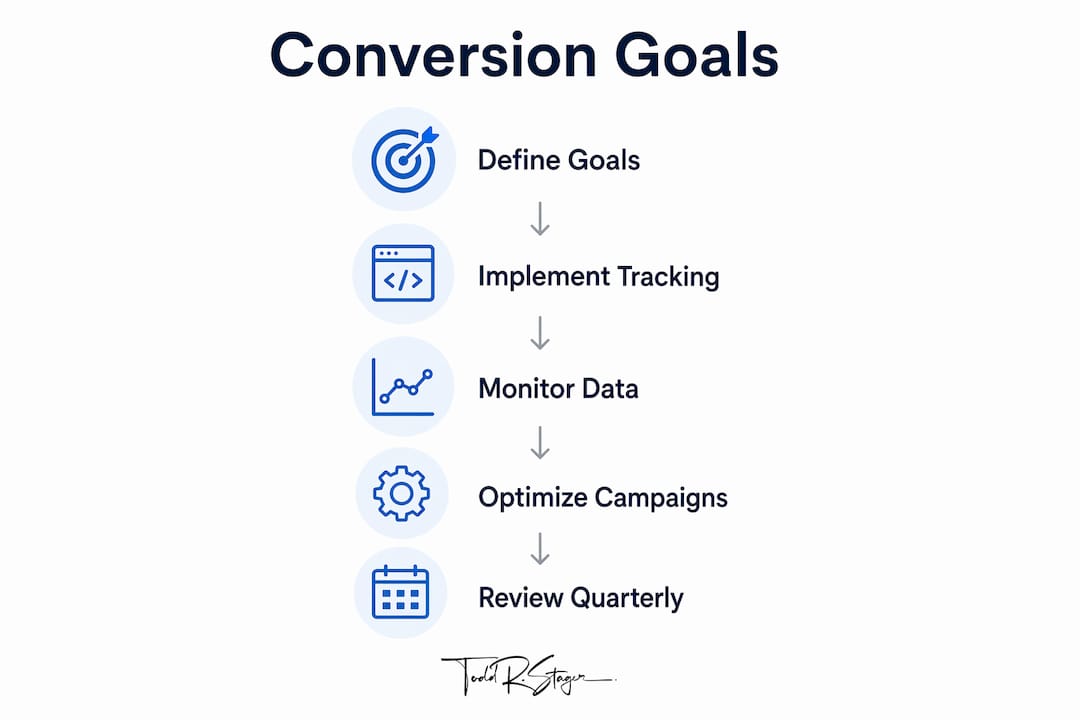
- Define your conversion actions. Decide what counts as a conversion for your business before touching any code. Purchases, form fills, and phone calls are common starting points.
- Install a tracking tag or pixel. Add the Google Tag, or a similar tracking snippet, to your website’s code. Most website builders like WordPress or Shopify have plugins that simplify this step.
- Set up goals in your analytics platform. In Google Analytics 4, configure conversion events that match the actions you defined. In Google Ads, create conversion actions tied to those same events.
- Test your tracking. Use Google Tag Assistant or the built-in diagnostics in Google Ads to confirm tags are firing correctly on the right pages.
- Verify data in your dashboard. After 24–48 hours of live traffic, check that conversions are recording accurately and that the numbers align with what you’d expect from your site activity.
Pro Tip: Set up conversion tracking before you launch any paid campaign. Retroactive data doesn’t exist, and every day you run ads without tracking is data you can never recover.
How to use conversion data to improve your campaigns
Collecting conversion data is step one. Using it is where the real value comes from. Tracked conversion data points directly to which campaigns deserve more budget and which ones should be paused.

Start by sorting your campaigns by conversion rate and CPA. The ones with low CPA and high conversion rate are your winners. Shift budget toward them. The ones burning spend with no conversions are candidates for pause or restructuring.
Conversion data also powers A/B testing. If two landing pages are getting similar traffic but one converts at twice the rate, that’s a clear signal to redirect visitors to the better page. You can also spot drop-off points in your funnel, such as a checkout page with high abandonment, and fix the friction causing it.
Key ways to act on conversion data:
- Reallocate budget from low-converting to high-converting campaigns
- Pause or rewrite ads with high click-through rates but poor conversion rates
- Use conversion insights to inform landing page copy and design changes
- Identify the highest-converting keywords and bid more aggressively on them
- Track customer journey stages to find where prospects are falling out of the funnel
Advanced insights that sharpen your tracking accuracy
Once your basic setup is running, a few deeper concepts will sharpen how accurately you measure results. The distinction between macro and micro conversions is one of the most useful diagnostic tools available. Micro conversions, like video views or cart additions, act as early warning signals when a funnel stage is underperforming, even before macro conversion numbers drop.

Cross-device tracking is another layer most small businesses overlook. A customer might click your ad on a phone during lunch and complete the purchase on a laptop that evening. Without cross-device attribution, that sale looks like it came from nowhere. Google Ads handles much of this automatically for signed-in users, but it’s worth understanding the limitation so you don’t undervalue mobile campaigns.
Privacy changes, including browser cookie restrictions and iOS privacy updates, have reduced tracking accuracy across the industry. Server-side tracking and offline conversion imports, where you connect your CRM to your ad platform to attribute contract signings or in-store visits, help fill those gaps.
Pro Tip: Review your conversion tracking setup every quarter. Tags break, pages change, and goals drift out of alignment with your actual business priorities. A quarterly audit catches these issues before they corrupt months of data.
How conversion tracking works across marketing channels
Conversion tracking looks different depending on the channel, but the underlying logic stays the same: connect a customer action back to the marketing touchpoint that influenced it.
PPC advertising is where conversion tracking is most mature. Google Ads ties every conversion directly to the keyword, ad group, and campaign that generated it, giving you granular data to optimize bids and copy. This is the channel where tracking has the most immediate impact on spend efficiency.
Email marketing uses UTM parameters, the tags you append to links in your emails, to tell Google Analytics which campaign drove a visit and whether that visit converted. A well-tagged email campaign lets you compare conversion rates across different subject lines, offers, and audience segments.
Social media platforms like those measured through Sprout Social use a combination of native pixels and UTM tracking. The Facebook Pixel, for example, fires when a visitor lands on your thank-you page after a purchase, attributing that sale back to the specific ad they clicked. Social conversion data tends to be less precise than PPC data due to privacy restrictions, but it still provides directional insight.
For service businesses tracking SEO performance, organic search conversions are measured through Google Analytics 4 by tagging goal completions and tying them to organic sessions. This is how you prove that your SEO investment is generating leads, not just traffic.
Key Takeaways
Conversion tracking connects every marketing dollar to a measurable business outcome, making it the foundation of any data-driven marketing strategy.
| Point | Details |
|---|---|
| Define conversions first | Decide what actions matter to your business before installing any tracking code. |
| Use the right tools | Google Ads and Google Analytics 4 cover most small business tracking needs out of the box. |
| Track macro and micro | Micro conversions reveal funnel problems before they show up in your revenue numbers. |
| Cross-device gaps are real | Customers switch devices; cross-device attribution prevents you from undervaluing mobile campaigns. |
| Tracking requires maintenance | Audit your setup quarterly to catch broken tags and misaligned goals before they skew your data. |
The part most businesses get wrong about conversion tracking
Most small business owners treat conversion tracking as a one-time setup task. They install the tag, confirm it fires, and move on. Six months later, they’re making budget decisions based on data that’s been broken since a site redesign removed the thank-you page their goal was pointed at.
Conversion tracking is a living system, not a checkbox. The businesses that get the most from it are the ones reviewing their data regularly, questioning anomalies, and adjusting their goals as their business evolves. If your conversion rate suddenly drops by half, that’s not always a marketing problem. It might be a broken tag, a changed URL, or a form that stopped submitting correctly.
The other mistake I see often is tracking only macro conversions. If all you’re watching is completed purchases, you’ll miss the signals that tell you why conversions are falling. Micro conversions, like add-to-cart rates or contact page visits, give you the diagnostic layer that makes the data useful for actual decisions. Tracking both gives you a complete picture of how your funnel is performing, not just the final score.
If you’re running SEO campaigns for a service business, a restaurant, or an automotive dealership, conversion tracking is what separates a ranking from a result. Rankings are vanity. Conversions are the point.