


TL;DR:
- Effective service page optimization centers on targeting one primary commercial keyword per page, structuring content around buyer questions, and enhancing technical SEO elements such as page speed and schema markup. Incorporating trust signals like reviews and clear CTAs significantly boosts visitor confidence and conversion rates. Properly optimized pages improve Google rankings and generate more qualified leads for small businesses across various industries.
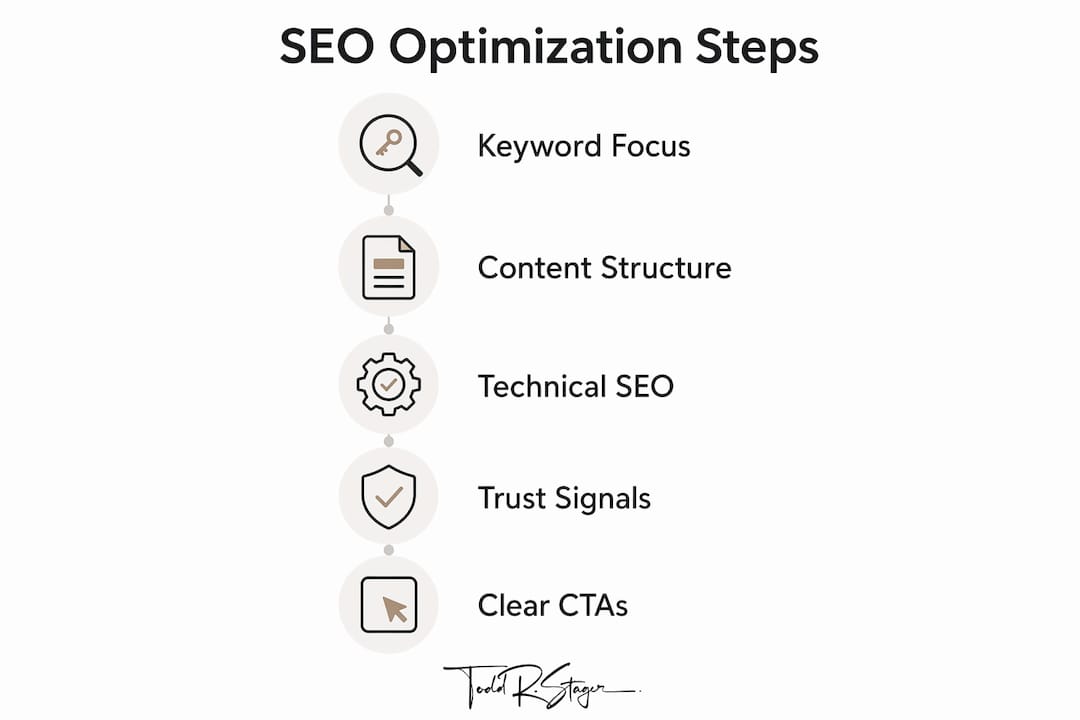
Service page optimization is the process of structuring, writing, and technically configuring individual service pages so they rank in Google search results and convert visitors into paying customers. For small business owners, this is where SEO investment pays off most directly. A well-optimized service page for HVAC repair, landscaping, or dental cleaning does two jobs at once: it pulls in qualified traffic and persuades that traffic to call or book. This guide covers the full service page optimization checklist, from keyword targeting and content structure to technical SEO and trust signals, so you can improve every page on your site with confidence.
How to optimize service pages with the right keyword focus
The single most important rule in service page SEO is one primary commercial intent per URL. That means your drain cleaning page targets “drain cleaning service in [city]” and your water heater repair page targets “water heater repair near me.” Mixing both services onto one page splits your relevance signal and confuses both Google and your visitor. Separate pages for distinct services increase ranking effectiveness because each page can be fully optimized around one specific search intent.
Choosing the right keyword starts with understanding commercial intent. Phrases like “hire a plumber in Austin” or “best HVAC company Chicago” signal a buyer who is ready to act. These are the terms worth targeting on your service pages, not informational phrases like “how does HVAC work.” Google Analytics 4, Google Search Console, and tools like Semrush or Ahrefs all surface the commercial queries your potential customers are already using.
Once you have your primary keyword, place it in these locations:
- Title tag: Keep it under 60 characters and lead with the service and location.
- Meta description: Write 150 to 160 characters that include the keyword and a clear benefit or call to action.
- H1 heading: Match the primary keyword as closely as possible to the search phrase.
- First 100 words of body copy: Signal relevance immediately to both Google and the reader.
- URL slug: Use a short, descriptive slug like /drain-cleaning-austin/ rather than /services/page-1/.
Keyword stuffing, meaning forcing the phrase into every sentence, actively hurts your rankings. Google’s natural language processing recognizes over-optimization and penalizes it. Write for the person reading the page, and use related terms like “clogged drain repair” or “emergency drain service” naturally throughout the copy.
How should you structure service page content for buyers?
Well-structured service pages optimized for parsing by search engines and AI assistants increase the chances of being featured in snippets and answer boxes. Structure is not just a readability concern. It is a ranking factor. Your H1 should match the primary keyword and state the service clearly. Your H2 sections should answer the questions buyers actually type into Google.
Here is a proven content order that converts:
- What you offer: State the service, location, and core benefit in the first paragraph. Clarity first.
- Who it’s for: Describe the customer situation. “If your pipes back up repeatedly, this service is built for you.”
- What’s included: List deliverables, steps, or scope so the visitor knows exactly what they get.
- Pricing or price range: Transparent pricing frameworks reduce visitor uncertainty and lead to higher-quality inquiries compared to vague statements like “call for a quote.”
- Your process: A numbered list of three to five steps builds confidence and reduces hesitation.
- FAQs: Question-and-answer pairs at the bottom of the page address objections and capture long-tail keyword traffic.
Each H2 should mirror how a buyer phrases their question. “How much does drain cleaning cost in Austin?” performs better as a heading than “Pricing Information” because it matches the actual search query. This approach improves both ranking and comprehension.
Use bullet points to break down service features, and numbered lists to explain processes. Short paragraphs of three to five sentences keep the page scannable. Most visitors skim before they read, so your headings and bullet points carry more weight than your body copy in the first pass.

Pro Tip: Add a short FAQ section at the bottom of every service page using real questions from your customers. These question-and-answer pairs capture long-tail searches and improve your chances of appearing in Google’s “People Also Ask” boxes.
What technical SEO does your service page need?
Technical performance is the foundation that makes all your content work visible to Google. A page with great copy but slow load times and broken schema will underperform every time. The table below outlines the core technical factors and what each one requires.
| Technical Factor | What to Do |
|---|---|
| Page speed | Run Google PageSpeed Insights; compress images over 200KB and reduce third-party scripts |
| Mobile usability | Use large tap targets, readable font sizes, and a single-column layout for mobile screens |
| Schema markup | Add LocalBusiness, Service, and FAQPage schema in JSON-LD format |
| Internal linking | Link from service pages to related blogs, FAQs, and other service pages |
| Core Web Vitals | Target LCP under 2.5 seconds, CLS under 0.1, and INP under 200ms |
A mobile PageSpeed Insights score under 50 signals serious performance problems. Since Google uses mobile-first indexing, a slow mobile page directly suppresses your rankings regardless of how good your content is. Compress every image, defer non-critical JavaScript, and use a content delivery network if your hosting plan supports it.
Schema markup is one of the highest-leverage technical improvements you can make. Implementing LocalBusiness, Service, and FAQPage schema increases click-through rates by 20 to 30% through rich results in Google Search. Rich results display your star ratings, service details, or FAQ answers directly in the search listing, which means more clicks before a visitor even lands on your page. Use Google’s Rich Results Test tool to validate your JSON-LD before publishing.
Internal linking from service pages to FAQs, blogs, and related services strengthens topical relevance and improves user engagement. Think of your service pages as entry points to a connected topic cluster. A plumbing company’s drain cleaning page should link to a blog post on “signs your drain needs professional cleaning” and to the water heater repair service page. This structure signals subject expertise to Google and guides visitors deeper into your site.
Pro Tip: Use Google Search Console’s Core Web Vitals report to identify specific pages with performance issues. Fix the pages with the most organic impressions first for the fastest ranking impact.
How do trust signals and CTAs improve service page conversions?
Strong CTAs placed multiple times and trust elements improve visitor confidence and conversion rates. A service page without social proof is a brochure. A service page with reviews, credentials, and specific CTAs is a lead generation tool. The difference in performance between the two is not marginal.
Here is what to include on every service page:
- Customer reviews: Display Google reviews or testimonials with the reviewer’s name, location, and specific outcome. Generic quotes like “Great service!” carry almost no weight.
- Video testimonials: Video testimonials can lift form completions by up to 25%, making them one of the highest-return trust elements you can add.
- Trust badges: Licenses, certifications, BBB accreditation, and industry association logos all reduce doubt at the moment of decision.
- Case studies or before-and-after results: Specific outcomes like “Reduced energy bills by 18% after HVAC tune-up” are far more persuasive than general claims.
- Multiple CTAs: Place a CTA above the fold, after your process section, and at the bottom of the page. Each one should be visible without scrolling past other content.
The language of your CTA matters as much as its placement. Specific, action-oriented CTAs like “Schedule Your Free Consultation” convert better than generic phrases like “Contact Us.” The more specific you are about what happens next, the lower the friction for the visitor. You can also learn more about trust-building through design to reinforce credibility across your entire site.
Conversion improvements often come fastest when you reorder content to clarify your offer first, build trust second, and explain your process third before placing the CTA. Most small business service pages do this in reverse, leading with company history before the visitor even knows if the service fits their need.
Pro Tip: Never create urgency that isn’t real. Fake countdown timers or false scarcity claims destroy trust the moment a visitor notices them. Honest urgency, like “We have two appointment slots open this week,” works because it’s true.
Key takeaways
Optimizing service pages requires focused keyword targeting, buyer-centered content structure, technical precision, and trust signals working together to rank and convert.
| Point | Details |
|---|---|
| One intent per page | Assign one commercial keyword per service page to maximize relevance and ranking clarity. |
| Structure answers buyer questions | Use H2 headings that mirror real search queries and include pricing, process, and FAQ sections. |
| Technical SEO is non-negotiable | Fix page speed, add schema markup, and build internal links before expecting ranking improvements. |
| Trust signals drive conversions | Add specific testimonials, trust badges, and video reviews to reduce visitor hesitation. |
| Specific CTAs outperform generic ones | Replace “Contact Us” with phrases like “Get Your Free Quote Today” to increase form completions. |
What I’ve learned from optimizing service pages for small businesses
I’ve worked with small business owners across dozens of industries, from roofing contractors to chiropractors, and the pattern I see most often is the same. The service page reads like an “About Us” page. It leads with company history, lists services in vague terms, and ends with a phone number buried in the footer. That page ranks for nothing and converts nobody.
The fix is almost always structural before it’s technical. When you clarify the offer in the first paragraph, answer the three questions every buyer has (what do I get, what does it cost, and why should I trust you), and place a specific CTA where the visitor’s eye naturally lands, the page starts working. The technical SEO, schema markup, and page speed improvements amplify a page that already makes sense to a human reader.
One thing I push back on with clients is the idea that more content automatically means better rankings. A 300-word service page with a clear offer, one strong testimonial, and proper schema will outperform a 2,000-word page that buries the point. Write to answer the buyer’s question, not to fill space. You can explore service area SEO tactics to extend this thinking to location-specific pages as well.
The user experience on mobile is the last thing most small business owners check and the first thing Google evaluates. Pull up your service page on your phone right now. If you have to pinch to zoom, scroll sideways, or wait more than three seconds for it to load, you are losing leads every day.
— TODD
Let Toddstager help you build service pages that rank
Toddstager specializes in SEO for small businesses across industries including HVAC, landscaping, dental practices, restaurants, and more. If your service pages are not generating consistent leads from organic search, the issue is almost always one of the four areas covered in this guide: keyword focus, content structure, technical performance, or trust signals.
Toddstager builds and optimizes service pages with a proven process tailored to your specific industry and local market. Whether you run a landscaping company or a restaurant, the same structured approach applies. Reach out to Toddstager today to get a service page audit and a clear plan for improving your rankings and lead volume.
FAQ
What is service page optimization?
Service page optimization is the process of improving a service page’s keyword targeting, content structure, technical performance, and trust signals so it ranks in Google and converts visitors into leads.
How many keywords should one service page target?
Each service page should target one primary commercial intent keyword, supported by related terms. Targeting multiple unrelated services on one page dilutes relevance and reduces ranking effectiveness.
Does page speed affect service page rankings?
Yes. A mobile PageSpeed score under 50 indicates serious performance issues that directly suppress rankings. Google uses mobile-first indexing, so slow mobile pages rank lower regardless of content quality.
What schema markup should service pages use?
Service pages benefit most from LocalBusiness, Service, and FAQPage schema in JSON-LD format. These schema types increase click-through rates by 20 to 30% through rich results in Google Search.
How do I write a CTA that converts on a service page?
Use specific, action-oriented language like “Schedule Your Free Consultation” or “Get Your Free Quote Today” instead of generic phrases like “Contact Us.” Place the CTA above the fold, after your process section, and at the bottom of the page.